to do list.
05/25/2006
To do list:
(1) send raw data file to Derek.
(2) make figures for the results
(3) write up the results. please pay attention to the style of presenting results.
(4) syntax highlighting in vi editor
05/25/2006
To do list:
(1) send raw data file to Derek.
(2) make figures for the results
(3) write up the results. please pay attention to the style of presenting results.
(4) syntax highlighting in vi editor
X11 display forwarding
The X11 user interface allows users to run applications on one computer, but display the graphical interface on a different computer. This is called display forwarding.
Getting an account
To run X11 using display forwarding you must first have an account on a server that supports X11 forwarding and has X11 applications installed. The Math department is an example of one department that has both. In fact, the Math department offers many more X11 programs than our computers.
The Math department will create accounts for University of Utah students who can show justification to use their software. If you would like access to their programs, please visit their lab.
Read more here: www.math.utah.edu/ugrad/lab.html
There are also other departments on campus that will allow X11 display forwarding from their computers. Please contact your department's computer administrators to find out.
When you have an account on another computer, and you can login using "ssh", then you are ready to use X11 display forwarding.
Display forwarding
First open an xterm window by bringing X11 to the front and selecting the menu "Applications", then "Terminal". This will open an xterm window. Note, "/Applications/Public Utilities/Apple/Terminal.app" is very similar to xterm, but it will NOT do X11 display forwarding, only xterm can.
In xterm, enable X11 display forwarding by logging into another computer using ssh and add the "-X" parameter to the ssh command. For example, to use X11 on a Mac to view sas running on a Sun server, in the xterm window, type:
% ssh -X user@xserver.math.utah.edu
% sas
or to run only sas
% ssh -X -f user@xserver.math.utah.edu sas
You will not get much feedback that anything is happening. But if you wait, eventually windows should start showing. And that is it. Except you can not close the xterm window or quit X11. If you do, it will quit any X11 applications running in the xterm window.
Note: because of firewall settings on the Macintosh computers, not all X11 applications will work correctly when displayed locally but running on a remote computer.
http://www.itc.virginia.edu/research/matlab/
matlab -nojvm -nodesktop
there matlab should be specified the full path.
MATLAB 6.5.1
MATLAB is a high-level technical computing language and interactive environment for algorithm development, data visualization, data analysis, and numerical computation. Using MATLAB, you can solve technical computing problems faster than with traditional programming languages, such as C, C++, and Fortran.
Read more about MATLAB.
To launch MATLAB, in the Finder, double click on "/Applications/General/X11/Matlab_6.5.1/Matlab 6.5.1". The icon that appears in the Dock at the bottom of the screen is NOT MATLAB, but a helper application that launches MATLAB. It will bounce alot because it is set to bounce for about 30 seconds no matter what else is happening. Eventually it will go away and a second MATLAB icon will appear in the dock. That is the real MATLAB application.
If the MATLAB application never appears, then try opening MATLAB in xterm. If there are errors, you will see them in the xterm window, and then you can report this to us.
You can launch MATLAB in xterm by typing:
/Applications/General/X11/Matlab_6.5.1/bin/matlab
(http://www.scl.utah.edu/computers/mac/help/x11/)
父母亲老担心自己的孩子在网上会受到不良影响,接触到一些诸如“黄色电影,黄色书籍,黄色音乐”之类的“黄色”的东东,从而一刀切地不准孩子上网。其实,只要引导得当,还是有很多优秀的网站值得去看一看的,能学到不少东西的哦。
今天,我们就来看看这些“黄色”词语该怎么用英语表达。 如果把它们译为yellow movies, yellow books, yellow music说给native speakers听,那他们肯定听不懂。因为英语中没有这样的表达法。那么,汉语中的“黄色书籍”之类的词怎样用英语来表示呢?
翻译时我们可以参考以下一些英语单词:pornographic(色情的),trashy(无聊的,低级的),obscene(淫秽的),filthy(淫猥的)或vulgar(庸俗的,下流的)。
所以,“黄色电影”可译为pornographic movies或者obscene movies;“黄色书刊”可译为filthy books,而“黄色音乐”可译为vulgar music。
不过,需要特别指出的是:英语中Yellow Pages并不是我们所想象的是“内容淫秽,描写粗俗,令人不堪入目”的“黄色书籍”。实际上,Yellow Pages是指按不同的商店、企业、事业、机关分类的电话号码簿。因为整本书都用黄纸印刷,所以称Yellow Pages,也就是我们常说的“黄页”。
对于那些obscene things或者filthy things, 我相信,具有上进心的你应该有self-control ability。Right?
If the arguments to a replace command are in lower case, it preserves case when it makes a replacement. Thus, the command
M-x replace-string RET foo RET bar RET
replaces a lower case `foo' with a lower case `bar', an all-caps `FOO' with `BAR', and a capitalized `Foo' with `Bar'. (These three alternatives--lower case, all caps, and capitalized, are the only ones that replace-string can distinguish.)
If upper-case letters are used in the second argument, they remain upper case every time that argument is inserted. If upper-case letters are used in the first argument, the second argument is always substituted exactly as given, with no case conversion. Likewise, if the variable case-replace is set to nil, replacement is done without case conversion. If case-fold-search is set to nil, case is significant in matching occurrences of `foo' to replace; this also inhibits case conversion of the replacement string.
here it is:
http://www.astro.psu.edu/main/index.php?module=pagemaster&PAGE_user_op=view_page&PAGE_id=160
here is the CUPS link
http://localhost:631/
As we know, in xemacs, there is one option which can print text in pretty format. But do you know how to realize it in the normal command line in unix? Here they are:
enscript -E -p output_filename source_filename
here are some nice examples (copy from manual):
---------------------------------
PRINTING EXAMPLES
Following printing examples assume that enscript uses the default con-
figuration. If default actions have been changed from the configura-
tion files, some examples will behave differently.
enscript foo.txt
Print file foo.txt to the default printer.
enscript -Possu foo.txt
Print file foo.txt to printer ossu.
enscript -pfoo.ps foo.txt
Print file foo.txt, but leave PostScript output to file foo.ps.
enscript -2 foo.txt
Print file foo.txt to two columns.
enscript -2r foo.txt
Print file to two columns and rotate output 90 degrees (land-
scape).
enscript -DDuplex:true foo.txt
Print file in duplex (two side) mode (printer dependent).
enscript -G2rE -U2 foo.c
My default code printing command: gaudy header, two columns,
landscape, code highlighting, 2-up printing.
enscript -E --color -Whtml --toc -pfoo.html *.h *.c
A nice HTML report of your project's C source files.
| Function | Description |
| deal | Deal inputs to outputs. |
| fieldnames | Get structure field names. |
| isstruct | Return true for structures. |
| rmfield | Remove a structure field. |
| struct | Create or convert to a structure array. |
| struct2cell | Convert a structure array into a cell array. |
JWST Fast Facts
The James Webb Space Telescope (JWST) is an orbiting infrared observatory that will take the place of the Hubble Space Telescope at the end of this decade. It will study the Universe at the important but previously unobserved epoch of galaxy formation. It will peer through dust to witness the birth of stars and planetary systems similar to our own. And using JWST, scientists hope to get a better understanding of the intriguing dark matter problem. The JWST is also a key element in NASA's Origins Program .
* Proposed Launch Date: no earlier than June 2013
* Proposed Launch Vehicle: Ariane 5
* Mission Duration: 5 - 10 years
* Total payload mass: Approx 6200 kg, including observatory, on-orbit consumables and launch vehicle adaptor.
* Diameter of primary Mirror: ~6.5 m (21.3 ft)
* Clear aperture of primary Mirror: 25 m 2
* Primary mirror material: beryllium
* Mass of primary mirror: about one-third as much as Hubble's
* Focal length: TBD
* Number of primary mirror segments: 18
* Optical resolution: ~0.1 arc-seconds
* Wavelength coverage: 0.6 - 28 microns
* Size of sun shield: ~22 m x 10 m (72 ft x 33 ft)
* Orbit: 1.5 million km from Earth at L2 Point
* Operating Temperature: under 50 K (-370 deg;F)
---------------------------------------------------------------------
For wmap, its temperature is below < 95 K.
http://map.gsfc.nasa.gov/m_mm/ob_techsummary.html#PageTop
----------------------------------------------------------
Black boday peak wavelength
lamda = 2898 / T (micron).
So for T=50 K, peak wavelength is around 60 micron which is out of the obvering band 0.6-28 micron.
L2 point is 1.5 million km from Earth and average orbital radius for the moon is 38000 km. So L2 point is outside of the moon orbit. Here is a graphical illustration.
Description of JWST is listed below.
JWST will observe primarily the infrared light from faint and very distant objects. But all objects, including telescopes, also emit infrared light. To avoid swamping the very faint astronomical signals with radiation from the telescope, the telescope and its instruments must be very cold. Therefore, JWST has a large shield that blocks the light from the Sun, Earth, and Moon, which otherwise would heat up the telescope, and interfere with the observations.
The five Lagrangian points of the Earth-Sun system.
To have this work, JWST must be in an orbit where all three of these objects are in about the same direction. The most convenient point is the second Lagrange point (L2) of the Sun-Earth system, a semi-stable point in the gravitational potential around the Sun and Earth.
---------------------------------------------
The Lagrange Points
http://map.gsfc.nasa.gov/m_mm/ob_techorbit1.html
The Italian-French mathematician Joseph-Louis Lagrange discovered five special points in the vicinity of two orbiting masses where a third, smaller mass can orbit at a fixed distance from the larger masses. More precisely, the Lagrange Points mark positions where the gravitational pull of the two large masses precisely equals the centripetal force required to rotate with them. Those with a mathematical flair can follow this link to a derivation of Lagrange's result (168K PDF file, 8 pages).
Of the five Lagrange points, three are unstable and two are stable. The unstable Lagrange points - labeled L1, L2 and L3 - lie along the line connecting the two large masses. The stable Lagrange points - labeled L4 and L5 - form the apex of two equilateral triangles that have the large masses at their vertices.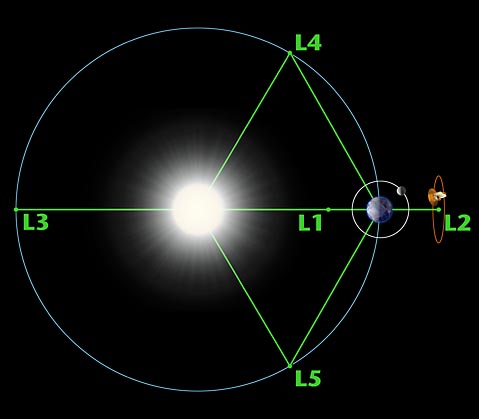
The L1 point of the Earth-Sun system affords an uninterrupted view of the sun and is currently home to the Solar and Heliospheric Observatory Satellite SOHO. The L2 point of the Earth-Sun system is home to the WMAP spacecraft and (perhaps by the year 2011) the James Webb Space Telescope. The L1 and L2 points are unstable on a time scale of approximately 23 days, which requires satellites parked at these positions to undergo regular course and attitude corrections.
NASA is unlikely to find any use for the L3 point since it remains hidden behind the Sun at all times. The idea of a hidden "Planet-X" at the L3 point has been a popular topic in science fiction writing. The instability of Planet X's orbit (on a time scale of 150 years) didn't stop Hollywood from turning out classics like The Man from Planet X.
The L4 and L5 points are home to stable orbits so long as the mass ratio between the two large masses exceeds 24.96. This condition is satisfied for both the Earth-Sun and Earth-Moon systems, and for many other pairs of bodies in the solar system. Objects found orbiting at the L4 and L5 points are often called Trojans after the three large asteroids Agamemnon, Achilles and Hector that orbit in the L4 and L5 points of the Jupiter-Sun system. (According to Homer, Hector was the Trojan champion slain by Achilles during King Agamemnon's siege of Troy). There are hundreds of Trojan Asteroids in the solar system. Most orbit with Jupiter, but others orbit with Mars. In addition, several of Saturn's moons have Trojan companions. No large asteroids have been found at the Trojan points of the Earth-Moon or Earth-Sun systems. However, in 1956 the Polish astronomer Kordylewski discovered large concentrations of dust at the Trojan points of the Earth-Moon system. Recently, the DIRBE instrument on the COBE satellite confirmed earlier IRAS observations of a dust ring following the Earth's orbit around the Sun. The existence of this ring is closely related to the Trojan points, but the story is complicated by the effects of radiation pressure on the dust grains.
Finding the Lagrange Points
The easiest way to see how Lagrange made his discovery is to adopt a frame of reference that rotates with the system. The forces exerted on a body at rest in this frame can be derived from an effective potential in much the same way that wind speeds can be inferred from a weather map. The forces are strongest when the contours of the effective potential are closest together and weakest when the contours are far apart.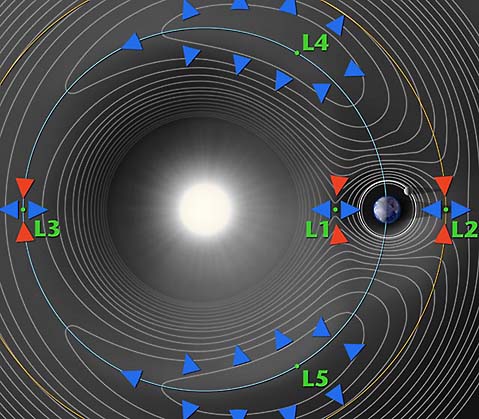
In the above contour plot we see that L4 and L5 correspond to hilltops and L1, L2 and L3 correspond to saddles (i.e. points where the potential is curving up in one direction and down in the other). This suggests that satellites placed at the Lagrange points will have a tendency to wander off (try sitting a marble on top of a watermelon or on top of a real saddle and you get the idea). A detailed analysis (PDF link) confirms our expectations for L1, L2 and L3, but not for L4 and L5. When a satellite parked at L4 or L5 starts to roll off the hill it picks up speed. At this point the Coriolis force comes into play - the same force that causes hurricanes to spin up on the earth - and sends the satellite into a stable orbit around the Lagrange point.
This page was originally written by Neil J. Cornish as part of WMAP's education and outreach program.
A full description is below. main difference is that hi8 is analog format and miniDV is digital. On the other hand, that is the only difference for digital8 and miniDV.
http://en.wikipedia.org/wiki/Hi8
----------------------------------------------------
drill down:
the process of dividing information into a hierarchical scheme, honing in on a small area; thorough investigation and discussion of a narrow topic
(v) In information technology, to move from summary information to detailed data by focusing in on something. To drill down through a series of folders, for example, on a desktop means to go through the hierarchy of folders to find a specific file or to click through drop-down menus in a GUI. To drill down through a database is to access information by starting with a general category and moving through the hierarchy of field to file to record.
(n) Spelled drilldown. The act of focusing in. For example, "He got the information he needed through a drilldown of the database."
there are three functions which can read text data file:
textread
load
dlmread
Below I make a comparison among their reading speed. It turns out that textread is an obvious winner.
--------------------------------
tic
s8=textread('fget1.txt','%f');
toc
tic
s9=load('fget1.txt');
toc
tic
s7=dlmread('fget1.txt');
toc
--------------------------
fget1.txt contains one dimentional array data with 1261050 lines.
Time consumed for each function:
textread: Elapsed time is 5.437752 seconds.
load: Elapsed time is 10.676539 seconds.
dlmread: Elapsed time is 12.076604 seconds.
