current and future telescope projects
http://www.astrosociety.org/pubs/mercury/34_01/sherrill.html
http://map.gsfc.nasa.gov/m_mm/ob_techorbit1.html
http://www.astrosociety.org/pubs/mercury/34_01/sherrill.html
http://map.gsfc.nasa.gov/m_mm/ob_techorbit1.html
FILE命令不对,
http://www.hydrogenaudio.org/forums/lofiversion/index.php/t42637.html
http://digitalx.org/cuesheetsyntax.php#file
Ensure that the FILE command in the cuesheet looks like:
FILE "
If you are using a vorbis comment you could use Tag.exe to export the cuesheet to a .cue file, edit it in Notepad, and then embed again.
Export:
TAG.EXE --tocuea "
Embed:
TAG.EXE -f "CUESHEET=
http://mintaka.sdsu.edu/GF/bibliog/latex/floats.html
http://www.andy-roberts.net/misc/latex/latextutorial6.html
http://www.taolang.com/surain/post/24.html
解决在windows英文版下打开chm文件出现mk:@msitstore错误
我在安装的windows 2003 英文版下,直接点击打开*.chm文件时提示错误:cannot open mk:@msitstore:x盘:\文件名.chm
解决办法:(chm文件类型与HH.EXE程序关联正常的情况下)到系统控制面板中,把“Regional and Language Options”中的区域设置改为“Chinese(PRC)”即可。
这个解决方法我是在google中搜索到的,但是只能在快照浏览了,原网址已经打不开,所以就干脆放一份在这里。下面的是我结合本文评论内容的整理:
1,chm文件类型与HH.EXE程序关联是否正常;
2,运行 regsvr32 %systemroot%\system32\hhctrl.ocx;
3,到系统控制面板中,把“Regional and Language Options”中的区域设置改为“Chinese(PRC)”,当然,你要先安装了东亚语言支持哦;
4,运行 regsvr32 %windir%\system32\itss.dll,以重新注册此控件。
http://mikezhang.com/wp/2006/09/29/natbib-reference/
Reference sheet for natbib usage
(Describing version 7.0b from 2002/02/27)
For a more detailed description of the natbib package, LATEX the source file natbib.dtx.
Overview
The natbib package is a reimplementation of the LATEX \cite command, to work with both author-year and numerical citations. It is compatible with the standard bibliographic style files, such as plain.bst, as well as with those for harvard, apalike, chicago, astron, authordate.
Loading
Load with \usepackage[options]{natbib}. See list of options at the end.
Replacement bibliography styles
I provide three new .bst files to replace the standard LATEX numerical ones:
plainnat.bst abbrvnat.bst unsrtnat.bst
Basic commands
The natbib package has two basic citation commands, \citet and \citep for textual and parenthetical citations, respectively. There also exist the starred versions \citet* and \citep* that print the full author list, and not just the abbreviated one. All of these may take one or two optional arguments to add some text before and after the citation.
\citet{jon90} –> Jones et al. (1990)
\citet[chap. 2]{jon90} –> Jones et al. (1990, chap. 2)
\citep{jon90} –> (Jones et al., 1990)
\citep[chap. 2]{jon90} –> (Jones et al., 1990, chap. 2)
\citep[see][]{jon90} –> (see Jones et al., 1990)
\citep[see][chap. 2]{jon90} –> (see Jones et al., 1990, chap. 2)
\citet*{jon90} –> Jones, Baker, and Williams (1990)
\citep*{jon90} –> (Jones, Baker, and Williams, 1990)
Multiple citations
Multiple citations may be made by including more than one citation key in the \cite command argument.
\citet{jon90,jam91} –> Jones et al. (1990); James et al. (1991)
\citep{jon90,jam91} –> (Jones et al., 1990; James et al. 1991)
\citep{jon90,jon91} –> (Jones et al., 1990, 1991)
\citep{jon90a,jon90b} –> (Jones et al., 1990a,b)
Numerical mode
These examples are for author-year citation mode. In numerical mode, the results are different.
\citet{jon90} –> Jones et al. [21]
\citet[chap. 2]{jon90} –> Jones et al. [21, chap. 2]
\citep{jon90} –> [21]
\citep[chap. 2]{jon90} –> [21, chap. 2]
\citep[see][]{jon90} –> [see 21]
\citep[see][chap. 2]{jon90} –> [see 21, chap. 2]
\citep{jon90a,jon90b} –> [21, 32]
Suppressed parentheses
As an alternative form of citation, \citealt is the same as \citet but without parentheses. Similarly, \citealp is \citep without parentheses. Multiple references, notes, and the starred variants also exist.
\citealt{jon90} –> Jones et al. 1990
\citealt*{jon90} –> Jones, Baker, and Williams 1990
\citealp{jon90} –> Jones et al., 1990
\citealp*{jon90} –> Jones, Baker, and Williams, 1990
\citealp{jon90,jam91} –> Jones et al., 1990; James et al., 1991
\citealp[pg. 32]{jon90} –> Jones et al., 1990, pg. 32
\citetext{priv. comm.} –> (priv. comm.)
The \citetext command allows arbitrary text to be placed in the current citation parentheses. This may be used in combination with \citealp.
Partial citations
In author-year schemes, it is sometimes desirable to be able to refer to the authors without the year, or vice versa. This is provided with the extra commands
\citeauthor{jon90} –> Jones et al.
\citeauthor*{jon90} –> Jones, Baker, and Williams
\citeyear{jon90} –> 1990
\citeyearpar{jon90} –> (1990)
Forcing upper cased names
If the first author’s name contains a von part, such as “della Robbia'’, then \citet{dRob98} produces “della Robbia (1998)'’, even at the beginning of a sentence. One can force the first letter to be in upper case with the command \Citet instead. Other upper case commands also exist.
when \citet{dRob98} –> della Robbia (1998)
then \Citet{dRob98} –> Della Robbia (1998)
\Citep{dRob98} –> (Della Robbia, 1998)
\Citealt{dRob98} –> Della Robbia 1998
\Citealp{dRob98} –> Della Robbia, 1998
\Citeauthor{dRob98} –> Della Robbia
These commands also exist in starred versions for full author names.
Citation aliasing
Sometimes one wants to refer to a reference with a special designation, rather than by the authors, i.e. as Paper I, Paper II. Such aliases can be defined and used, textual and/or parenthetical with:
\defcitealias{jon90}{Paper I}
\citetalias{jon90} -> Paper I
\citepalias{jon90} -> (Paper I)
These citation commands function much like \citet and \citep: they may take multiple keys in the argument, may contain notes, and are marked as hyperlinks.
Selecting citation style and punctuation
Use the command \bibpunct with one optional and 6 mandatory arguments:
the opening bracket symbol, default = (
the closing bracket symbol, default = )
the punctuation between multiple citations, default = ;
the letter `n’ for numerical style, or `s’ for numerical superscript style, any other letter for author-year, default = author-year;
the punctuation that comes between the author names and the year
the punctuation that comes between years or numbers when common author lists are suppressed (default = ,);
The optional argument is the character preceding a post-note, default is a comma plus space. In redefining this character, one must include a space if one is wanted.
Example 1, \bibpunct{[}{]}{,}{a}{}{;} changes the output of
\citepjon90,jon91,jam92
into [Jones et al. 1990; 1991, James et al. 1992].Example 2, \bibpunct[; ]{(}{)}{,}{a}{}{;} changes the output of
\citep[and references therein]{jon90}
into (Jones et al. 1990; and references therein).
Other formatting options
Redefine \bibsection to the desired sectioning command for introducing the list of references. This is normally \section* or \chapter*.
Define \bibpreamble to be any text that is to be printed after the heading but before the actual list of references.
Define \bibfont to be a font declaration, e.g. to apply to the list of references.
Define \citenumfont to be a font declaration or command like \itshape or \textit.
Redefine \bibnumfmt as a command with an argument to format the numbers in the list of references. The default definition is [#1].
The indentation after the first line of each reference is given by \bibhang; change this with the \setlength command.
The vertical spacing between references is set by \bibsep; change this with the \setlength command.
Automatic indexing of citations
If one wishes to have the citations entered in the .idx indexing file, it is only necessary to issue \citeindextrue at any point in the document. All following \cite commands, of all variations, then insert the corresponding entry to that file. With \citeindexfalse, these entries will no longer be made.
Use with chapterbib package
The natbib package is compatible with the chapterbib package which makes it possible to have several bibliographies in one document.
The package makes use of the \include command, and each \included file has its own bibliography.
The order in which the chapterbib and natbib packages are loaded is unimportant.
The chapterbib package provides an option sectionbib that puts the bibliography in a \section* instead of \chapter*, something that makes sense if there is a bibliography in each chapter. This option will not work when natbib is also loaded; instead, add the option to natbib.
Every \included file must contain its own \bibliography command where the bibliography is to appear. The database files listed as arguments to this command can be different in each file, of course. However, what is not so obvious, is that each file must also contain a \bibliographystyle command, preferably with the same style argument.
Sorting and compressing citations
Do not use the \cite package with natbib; rather use one of the options sort or sort&compress.These also work with author-year citations, making multiple citations appear in their order in the reference list.
Long author list on first citation
Use option longnamesfirst to have first citation automatically give the full list of authors.Suppress this for certain citations with \shortcites{key-list}, given before the first citation.
Local configuration
Any local recoding or definitions can be put in natbib.cfg which is read in after the main package file.
Options that can be added to \usepackage
round: (default) for round parentheses;
square: for square brackets;
curly: for curly braces;
angle: for angle brackets;
colon: (default) to separate multiple citations with colons;
comma: to use commas as separaters;
authoryear: (default) for author-year citations;
numbers: for numerical citations;
super: for superscripted numerical citations, as in Nature;
sort: orders multiple citations into the sequence in which they appear in the list of references;
sort&compress: as sort but in addition multiple numerical citations are compressed if possible (as 3-6, 15);
longnamesfirst: makes the first citation of any reference the equivalent of the starred variant (full author list) and subsequent citations normal (abbreviated list);
sectionbib: redefines \thebibliography to issue \section* instead of \chapter*; valid only for classes with a \chapter command; to be used with the chapterbib package;
nonamebreak: keeps all the authors’ names in a citation on one line; causes overfull hboxes but helps with some hyperref problems.
About this document …
This document was generated using the LaTeX2HTML translator Version 200 2-1 (1.68), © 1993, 1994, 1995, 1996, Nikos Drakos, Computer Based Learning Unit, University of Leeds, © 1997, 1998, 1999, Ross Moore, Mathematics Department, Macquarie University, Sydney.
The command line arguments were: latex2html -split 0 -no_navigation -t ‘Natbib reference sheet’ natnote s.tex
Original file: natnotes.tex, © 1993-2002 Patrick W Daly, Max-Planck-Institut fr Aeronomie, D-37191 Katlenburg-Lindau
The original LATEX file was modified by S. Merkel, Institute for Solid State Physics, Univ. of Tokyo, on 12/26/2002 to be converted to HTML properly.
The resulting HTML file was modified by S. Merkel as well.
The expression "lame duck" can be heard in almost any American town or city, especially where people discuss politics. Most often, they use it to describe a politician who has come to the end of his power, a congressman, for example, who has a few more weeks in office and will then be out of a job.
There are a number of ideas as to where "lame duck" came from, although the picture is clear enough, a duck that has had its wings clipped or its webbed feet injured, and can no longer walk or waddle like a healthy duck.
The term seems to have crept into the American language some time after the Civil War of 1861-1865. One explanation is that it came from the language of hunters who felt that it was foolish to waste powder or time on a dead duck. And a lame duck, even a sitting duck, is close to being a dead duck.
Another explanation, however, says that the expression came from England. There it was used to describe a man who lost all his money in stocks, was cleaned out and could not pay his debts. He could do nothing but waddle off like a lame duck. And, so the story goes, people showed little mercy for the poor fellow.
But in the United States people took the phrase to describe a congressman who failed to get reelected but still had a little time left in office until his successor was sworn in.
In time, the expression was used in a broader sense, generally describing any man whose days of power were coming to an end. It has often been used to describe the position of an American president in the last two years or so of his second term. It is a difficult time for him, a time when Congress is ready to oppose him at every turn.
It may refuse to work with him simply because his days in the White House are numbered. His sun is setting. It is not a happy time. It is like old age coming on. And people, like animals, are cruel to lame ducks, ready to drive them out. Their eyes are already turned toward the new leader, the new man in command.
注解:
lame 跛脚的
politics 政治
out of a job 无业
wings clipped 被剪掉翅膀
webbed feet 蹼足
waddle 摇摆地走
creep into 爬进;悄悄进入
explanation 解释
powder 弹药
stock 股票
get reelected 获选连任
successor 继任人
be sworn in 宣誓就职
in a broader sense 更广泛的意义
at every turn 老是;常常
days .... are numbered 余日有限
in command 接掌,指挥
http://forums.osxfaq.com/viewtopic.php?p=60501&sid=2c35c0d10e1eeaa4b74740b33c98e1a9
http://www.macosxhints.com/article.php?story=2003083122212228
Okey dokey
Meaning
Okay.
Origin
There's not much to be said about this little phrase, which is a variant of okay. It is 20th century American and first appears in print in Maurice Harley Weseen's 1934 Dictionary of American Slang:
"Okay doke, satisfactory; agreeable; all right."
It is really just a perky variant of okay, utilizing that favourite device of two-word phrases - rhyming. There are several alternative spellings - okay-doke, okey-doke, okee-doke etc.
Like okay it can be used to indicate that all is well, e.g. 'everything is okay here', it can be used when responding positively to a request. That is exemplified in this piece from Colin MacInnes' book 'City of Spades', 1957:
"One Guinness stout, right, I thank you, okey-doke, here it is."
http://ks.cn.yahoo.com/question/1306081704021.html
其实他只是一个DLL 连接而已 我们只需要使用CopyLock(你可以到google上自己搜)就可以删除他
在C:\WINDOWS\system32中 搜ejmx 会有一个ejmx.dll 和几个文本 文本直接就可以删除 ejmx.dll 要使用CopyLock
删除
Put in your .emacs file lines like
Of course you can bind other commands to other keys in the same way. Note that various major and minor modes redefine keybindings. For example, in incremental search mode one finds the code
(global-set-key "\C-h" 'delete-backward-char)
This means that it may be a bad idea to use the above two global-set-key commands. There are too many places where there are built-in assumptions about Ctrl-H = help and DEL = delete. That doesn't mean that you have to setup keys so that Backspace generates DEL. But if it doesn't then it is easiest to remap them at the lowest possible level in emacs.
(define-key map "\C-h" 'isearch-mode-help)
I am so excited now.
It is so awesome that the arrow key problem in emacs is solved. The problem is that while I started up some file with emacs, the arrow key will lose its function, and while I press those arrow key, some funny characters like "A", "B", etc will appear on the screen. INitially the problem occured to vim. After surfing internet for a while, I got the answer for vim, it is due to keyboard mapping problem. For the solution, please refer to previous post. Then, I started to work on the emacs keyboard problem. Although I have some idea that it is due to keyboard mapping problem, but still don't know where I should start, since I only know some basic stuff on emacs, like basic commands, no other further knowledge. So I set a direction to solve the problem: (1) To know what command is to bind a key. (2) what key should be bined.
After some test, finally the answer is to put below lines into .emacs.
-------------------------------------------
(global-set-key "^[OC" 'forward-char)
(global-set-key "^[OD" 'backward-char)
(global-set-key "^[OA" 'previous-line)
(global-set-key "^[OB" 'next-line)
-------------------------------------------
It should be pointed out that ^[OC should be braced with "" instead of square bracket which doesn't work as tested.
note that "^[" should be input by (ctrl+v) +[esc], rather than just copy them from screen here.
I got these inspiration from the links below, I really appreciate those people who have given me so much help anomyously.
http://www.xahlee.org/emacs/keyboard_shortcuts.html
Here are some convenient keyboard shortcuts i use, as a example of what type of keyboard shortcuts one can add to enhance productivity.
; keyboard alias for arrow keys
; with meta down,
; keys under the right hand home position become cursor keys
;        Dvorak       QWERTY
;          c            i
;         htn          jkl
(global-set-key "\M-h" 'backward-char) ; was mark-paragraph
(global-set-key "\M-n" 'forward-char)  ; was not defined
(global-set-key "\M-c" 'previous-line) ; was capitalize-word
(global-set-key "\M-t" 'next-line)     ; was transpose-words

http://gdfan.twbbs.org/blog/2005/09/21/328
http://www.vim.org/tips/tip.php?tip_id=550 (original link)

This doesn't really work very well for me on SunOS -- I have the same problem but :set term=cons25 just gives me OC everywhere before each character until I redraw.  Weird.

But, :set term=ansi works great, and the arrow keys work.

A better solution is to, while in vi, type in insert mode [ctrl-v][arrow up] and see what you get.
Then, in your .vimrc, add the lines
set t_ku=[ctrl-v][esc]OA    # or whatever you saw

so it ends up looking something like
set t_ku=^[OA
set t_kd=^[OB
set t_kr=^[OC
set t_kl=^[OD
(though you want REAL escape chars instead of ^[.)
http://www.vim.org/tips/tip.php?tip_id=26
http://www.computing.net/unix/wwwboard/forum/6031.html
http://web.mit.edu/answers/dialup/other_clean_ctrl_m.html
http://www.physics.ohio-state.edu/~faqomatic/fom-serve/cache/49.html
here is a code to remove the CTRL+M characters in a file.
http://forge.novell.com/modules/xfref_library/detail.php?reference_id=2358
在使用 vim 的插入模式(Insert mode)時候,按方向鍵(arrow key) ,卻出現 A B C D,游標(cursor)沒有正常的移動?多半是因為 TERM 環境變數設定的問題。今天在網路上找到了一個解法,直接在 .vimrc 中設定方向鍵的 mapping. 參考的文件是這裡
文章原文如下:
This doesn't really work very well for me on SunOS -- I have the same problem but :set term=cons25 just gives me OC everywhere before each character until I redraw. Weird.
But, :set term=ansi works great, and the arrow keys work.
A better solution is to, while in vi, type in insert mode [ctrl-v][arrow up] and see what you get.
Then, in your .vimrc, add the lines
set t_ku=[ctrl-v][esc]OA # or whatever you saw
so it ends up looking something like
set t_ku=^[OA
set t_kd=^[OB
set t_kr=^[OC
set t_kl=^[OD
(though you want REAL escape chars instead of ^[.)
Note: Please edit in vi editor.
(http://gdfan.twbbs.org/blog/2005/09/21/328)
http://www.vim.org/tips/tip.php?tip_id=550
(http://forums.afterdawn.com/thread_view.cfm/345467)
You will need to download a seperate plugin in order to play ape files. You can grab it here.
http://www.foobar2000.org/components/foo_input_monkey.zip
Extract the zip file. Place foo_input_monkey.dll in X:\Program Files\foobar2000\components. X being the default drive letter. Run Foobar. Go to file menu, select preferences. Go to file types. Under file type association, check the boxes MAC and APE. Apply the changes. Foobar will now associate APE and MAC (Monkey's Audio) files.
(Note: This component has known unresolved stability issues.)
If you want to look for other plugins to extend Foobars functionality, you can also look here.
http://www.foobar2000.org/components/index.html
http://magic.aladdin.cs.cmu.edu/category/software-tools/text-editing/
this is the link where I am going from.
link on emacs setup should be here,
http://www.cs.cmu.edu/~maverick/GNUEmacsColorThemeTest/
here is also one link for vim.
http://www.cs.cmu.edu/~maverick/VimColorSchemeTest/
http://www.linux-tutorial.info/modules.php?name=Tutorial&pageid=33
actually in linux, $1, $2 are called positional parameters.
I FINALLY unlocked my AT&T phone so I can use it for Cingular. Just wanted to share my painful experience and the lovely tutorial that ended my misery :P
Source: http://www.mobiledia.com/forum/topic7430.html
For any Samsung Phone Model S100 and up.MOST SAMSUNG phone will work,
Sample, Samsung Sgh e100, e105, e700,e708, e715, p100, p400, p407, p408, s200, s208, s300, s307, s308, v200, v205, v206, x105, x426, x427..& more
Warning: If this does work. DONT TRY MORE than 4 times. IT WILL TOTALLY LOCK YOUR PHONE.
1. Turn off your phone, put in a SIM of a provider that it is NOT LOCKED (difference company's SIM card) to, and turn it back on.
2. At the wrong card message, type *#9998*3323#. A message will pop up telling you to press exit, so hit the right soft key. Choose number 7 (or 8 or 9 will work too, I think). Your phone will reboot and your SIM will work.
3. Type *0141# and then hit call. This will give you a message saying your phone is personalized.
4. Power down your phone and insert a SIM card other(another company) than the one that is in it. Then power back up your phone.
5. At the SIM pass code prompt type 00000000, that is 8 zeroes. So that will totally UNLOCK your phone."
To enter wap settings: Enter *#vswap# or numerically, *#87927#
To enter mms settings: Enter *#vsmms# or numerically, *#87667#
http://www.macosxhints.com/article.php?story=20010421114134645
VIM ('Vi IMproved') is a replacement for vi that features a ton of enhancements, including colored syntax highlighting for a number of languages (Java, C/C++, HTML, PHP, PERL, etc) and the ability to save edited files as HTML with syntax colors. If you like using vi, you'll love VIM. Thanks to macosxhints reader jpzr, a friend from Poland, for the information on how to get this working! I followed his tips, tweaked a couple of things, and installed it with no problems.
Read the rest of this article if you'd like the step-by-step instructions on installing VIM for OS X. NOTE: You need to have the developer tools installed to compile VIM, and you should be fairly comfortable in the terminal ... then again, if you're using vi, you're probably quite comfortable in the terminal!
To compile VIM for OS X, follow these steps:
[robg]% gzip -d vim-5.7-rt.tar.gzThis will insure that everything winds up in the proper directories for the next steps.
[robg]% tar xvf vim-5.7-rt.tar
[robg]% gzip -d vim-5.7-src.tar.gz
[robg]% tar xvf vim-5.7-src.tar
[robg]% ./configure
[robg]% make
[robg]% sudo make install
:set term=builtin_beos-ansiIf you'd like VIM to launch in this mode all the time, you'll need a .vimrc file in your home directory which contains those two lines (without the colons, since they're the VIM command prompt). The .vimrc can be quite complex, of course. Here's jpzr's actual file:
:syntax on
set nocompatible
source $VIMRUNTIME/vimrc_example.vim
source $VIMRUNTIME/macros/explorer.vim
set selectmode=mouse
set backupdir=/tmp
set directory=/tmp
set guifont=Lucida_Console:h8
set guioptions-=T
set errorfile=/tmp/rutkowsk.errors.log
set ic
set grepprg=grep -n
set fileformats=dos,unix,mac
highlight StatusLineNC guifg=#ff0000 guibg=#000000
highlight StatusLine guifg=#00ff00 guibg=#000000
set hls
hi Normal guibg=black guifg=white
hi Search guibg=white guifg=black
hi IncSearch guibg=white guifg=black
set tags=./tags
set mousef
set term=builtin_beos-ansi
syntax on
Answer:
Hibernate and Standby are two different sleep options that Windows XP offers. Hibernate saves an image of your desktop, including all open windows and files. Then it powers down your computer just as if you had turned it off. When you turn your computer on again, your windows and files are open just as you left them.
Standby is a more traditional sleep mode, as it reduces the power your computer uses to almost nothing. When you select Standby, the power to your screen, hard drive, and peripheral devices is cut. However, the power to the computer's memory (RAM) is maintained so your open files stay open.
http://www.sharpened.net/helpcenter/answer.php?88
http://www.kellys-korner-xp.com/xp_h.htm
05/25/2006
To do list:
(1) send raw data file to Derek.
(2) make figures for the results
(3) write up the results. please pay attention to the style of presenting results.
(4) syntax highlighting in vi editor
X11 display forwarding
The X11 user interface allows users to run applications on one computer, but display the graphical interface on a different computer. This is called display forwarding.
Getting an account
To run X11 using display forwarding you must first have an account on a server that supports X11 forwarding and has X11 applications installed. The Math department is an example of one department that has both. In fact, the Math department offers many more X11 programs than our computers.
The Math department will create accounts for University of Utah students who can show justification to use their software. If you would like access to their programs, please visit their lab.
Read more here: www.math.utah.edu/ugrad/lab.html
There are also other departments on campus that will allow X11 display forwarding from their computers. Please contact your department's computer administrators to find out.
When you have an account on another computer, and you can login using "ssh", then you are ready to use X11 display forwarding.
Display forwarding
First open an xterm window by bringing X11 to the front and selecting the menu "Applications", then "Terminal". This will open an xterm window. Note, "/Applications/Public Utilities/Apple/Terminal.app" is very similar to xterm, but it will NOT do X11 display forwarding, only xterm can.
In xterm, enable X11 display forwarding by logging into another computer using ssh and add the "-X" parameter to the ssh command. For example, to use X11 on a Mac to view sas running on a Sun server, in the xterm window, type:
% ssh -X user@xserver.math.utah.edu
% sas
or to run only sas
% ssh -X -f user@xserver.math.utah.edu sas
You will not get much feedback that anything is happening. But if you wait, eventually windows should start showing. And that is it. Except you can not close the xterm window or quit X11. If you do, it will quit any X11 applications running in the xterm window.
Note: because of firewall settings on the Macintosh computers, not all X11 applications will work correctly when displayed locally but running on a remote computer.
http://www.itc.virginia.edu/research/matlab/
matlab -nojvm -nodesktop
there matlab should be specified the full path.
MATLAB 6.5.1
MATLAB is a high-level technical computing language and interactive environment for algorithm development, data visualization, data analysis, and numerical computation. Using MATLAB, you can solve technical computing problems faster than with traditional programming languages, such as C, C++, and Fortran.
Read more about MATLAB.
To launch MATLAB, in the Finder, double click on "/Applications/General/X11/Matlab_6.5.1/Matlab 6.5.1". The icon that appears in the Dock at the bottom of the screen is NOT MATLAB, but a helper application that launches MATLAB. It will bounce alot because it is set to bounce for about 30 seconds no matter what else is happening. Eventually it will go away and a second MATLAB icon will appear in the dock. That is the real MATLAB application.
If the MATLAB application never appears, then try opening MATLAB in xterm. If there are errors, you will see them in the xterm window, and then you can report this to us.
You can launch MATLAB in xterm by typing:
/Applications/General/X11/Matlab_6.5.1/bin/matlab
(http://www.scl.utah.edu/computers/mac/help/x11/)
父母亲老担心自己的孩子在网上会受到不良影响,接触到一些诸如“黄色电影,黄色书籍,黄色音乐”之类的“黄色”的东东,从而一刀切地不准孩子上网。其实,只要引导得当,还是有很多优秀的网站值得去看一看的,能学到不少东西的哦。
今天,我们就来看看这些“黄色”词语该怎么用英语表达。 如果把它们译为yellow movies, yellow books, yellow music说给native speakers听,那他们肯定听不懂。因为英语中没有这样的表达法。那么,汉语中的“黄色书籍”之类的词怎样用英语来表示呢?
翻译时我们可以参考以下一些英语单词:pornographic(色情的),trashy(无聊的,低级的),obscene(淫秽的),filthy(淫猥的)或vulgar(庸俗的,下流的)。
所以,“黄色电影”可译为pornographic movies或者obscene movies;“黄色书刊”可译为filthy books,而“黄色音乐”可译为vulgar music。
不过,需要特别指出的是:英语中Yellow Pages并不是我们所想象的是“内容淫秽,描写粗俗,令人不堪入目”的“黄色书籍”。实际上,Yellow Pages是指按不同的商店、企业、事业、机关分类的电话号码簿。因为整本书都用黄纸印刷,所以称Yellow Pages,也就是我们常说的“黄页”。
对于那些obscene things或者filthy things, 我相信,具有上进心的你应该有self-control ability。Right?
If the arguments to a replace command are in lower case, it preserves case when it makes a replacement. Thus, the command
M-x replace-string RET foo RET bar RET
replaces a lower case `foo' with a lower case `bar', an all-caps `FOO' with `BAR', and a capitalized `Foo' with `Bar'. (These three alternatives--lower case, all caps, and capitalized, are the only ones that replace-string can distinguish.)
If upper-case letters are used in the second argument, they remain upper case every time that argument is inserted. If upper-case letters are used in the first argument, the second argument is always substituted exactly as given, with no case conversion. Likewise, if the variable case-replace is set to nil, replacement is done without case conversion. If case-fold-search is set to nil, case is significant in matching occurrences of `foo' to replace; this also inhibits case conversion of the replacement string.
here it is:
http://www.astro.psu.edu/main/index.php?module=pagemaster&PAGE_user_op=view_page&PAGE_id=160
here is the CUPS link
http://localhost:631/
As we know, in xemacs, there is one option which can print text in pretty format. But do you know how to realize it in the normal command line in unix? Here they are:
enscript -E -p output_filename source_filename
here are some nice examples (copy from manual):
---------------------------------
PRINTING EXAMPLES
Following printing examples assume that enscript uses the default con-
figuration. If default actions have been changed from the configura-
tion files, some examples will behave differently.
enscript foo.txt
Print file foo.txt to the default printer.
enscript -Possu foo.txt
Print file foo.txt to printer ossu.
enscript -pfoo.ps foo.txt
Print file foo.txt, but leave PostScript output to file foo.ps.
enscript -2 foo.txt
Print file foo.txt to two columns.
enscript -2r foo.txt
Print file to two columns and rotate output 90 degrees (land-
scape).
enscript -DDuplex:true foo.txt
Print file in duplex (two side) mode (printer dependent).
enscript -G2rE -U2 foo.c
My default code printing command: gaudy header, two columns,
landscape, code highlighting, 2-up printing.
enscript -E --color -Whtml --toc -pfoo.html *.h *.c
A nice HTML report of your project's C source files.
| Function | Description |
| deal | Deal inputs to outputs. |
| fieldnames | Get structure field names. |
| isstruct | Return true for structures. |
| rmfield | Remove a structure field. |
| struct | Create or convert to a structure array. |
| struct2cell | Convert a structure array into a cell array. |
JWST Fast Facts
The James Webb Space Telescope (JWST) is an orbiting infrared observatory that will take the place of the Hubble Space Telescope at the end of this decade. It will study the Universe at the important but previously unobserved epoch of galaxy formation. It will peer through dust to witness the birth of stars and planetary systems similar to our own. And using JWST, scientists hope to get a better understanding of the intriguing dark matter problem. The JWST is also a key element in NASA's Origins Program .
* Proposed Launch Date: no earlier than June 2013
* Proposed Launch Vehicle: Ariane 5
* Mission Duration: 5 - 10 years
* Total payload mass: Approx 6200 kg, including observatory, on-orbit consumables and launch vehicle adaptor.
* Diameter of primary Mirror: ~6.5 m (21.3 ft)
* Clear aperture of primary Mirror: 25 m 2
* Primary mirror material: beryllium
* Mass of primary mirror: about one-third as much as Hubble's
* Focal length: TBD
* Number of primary mirror segments: 18
* Optical resolution: ~0.1 arc-seconds
* Wavelength coverage: 0.6 - 28 microns
* Size of sun shield: ~22 m x 10 m (72 ft x 33 ft)
* Orbit: 1.5 million km from Earth at L2 Point
* Operating Temperature: under 50 K (-370 deg;F)
---------------------------------------------------------------------
For wmap, its temperature is below < 95 K.
http://map.gsfc.nasa.gov/m_mm/ob_techsummary.html#PageTop
----------------------------------------------------------
Black boday peak wavelength
lamda = 2898 / T (micron).
So for T=50 K, peak wavelength is around 60 micron which is out of the obvering band 0.6-28 micron.
L2 point is 1.5 million km from Earth and average orbital radius for the moon is 38000 km. So L2 point is outside of the moon orbit. Here is a graphical illustration.
Description of JWST is listed below.
JWST will observe primarily the infrared light from faint and very distant objects. But all objects, including telescopes, also emit infrared light. To avoid swamping the very faint astronomical signals with radiation from the telescope, the telescope and its instruments must be very cold. Therefore, JWST has a large shield that blocks the light from the Sun, Earth, and Moon, which otherwise would heat up the telescope, and interfere with the observations.
The five Lagrangian points of the Earth-Sun system.
To have this work, JWST must be in an orbit where all three of these objects are in about the same direction. The most convenient point is the second Lagrange point (L2) of the Sun-Earth system, a semi-stable point in the gravitational potential around the Sun and Earth.
---------------------------------------------
The Lagrange Points
http://map.gsfc.nasa.gov/m_mm/ob_techorbit1.html
The Italian-French mathematician Joseph-Louis Lagrange discovered five special points in the vicinity of two orbiting masses where a third, smaller mass can orbit at a fixed distance from the larger masses. More precisely, the Lagrange Points mark positions where the gravitational pull of the two large masses precisely equals the centripetal force required to rotate with them. Those with a mathematical flair can follow this link to a derivation of Lagrange's result (168K PDF file, 8 pages).
Of the five Lagrange points, three are unstable and two are stable. The unstable Lagrange points - labeled L1, L2 and L3 - lie along the line connecting the two large masses. The stable Lagrange points - labeled L4 and L5 - form the apex of two equilateral triangles that have the large masses at their vertices.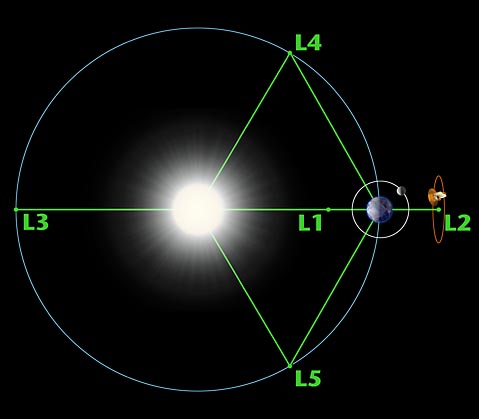
The L1 point of the Earth-Sun system affords an uninterrupted view of the sun and is currently home to the Solar and Heliospheric Observatory Satellite SOHO. The L2 point of the Earth-Sun system is home to the WMAP spacecraft and (perhaps by the year 2011) the James Webb Space Telescope. The L1 and L2 points are unstable on a time scale of approximately 23 days, which requires satellites parked at these positions to undergo regular course and attitude corrections.
NASA is unlikely to find any use for the L3 point since it remains hidden behind the Sun at all times. The idea of a hidden "Planet-X" at the L3 point has been a popular topic in science fiction writing. The instability of Planet X's orbit (on a time scale of 150 years) didn't stop Hollywood from turning out classics like The Man from Planet X.
The L4 and L5 points are home to stable orbits so long as the mass ratio between the two large masses exceeds 24.96. This condition is satisfied for both the Earth-Sun and Earth-Moon systems, and for many other pairs of bodies in the solar system. Objects found orbiting at the L4 and L5 points are often called Trojans after the three large asteroids Agamemnon, Achilles and Hector that orbit in the L4 and L5 points of the Jupiter-Sun system. (According to Homer, Hector was the Trojan champion slain by Achilles during King Agamemnon's siege of Troy). There are hundreds of Trojan Asteroids in the solar system. Most orbit with Jupiter, but others orbit with Mars. In addition, several of Saturn's moons have Trojan companions. No large asteroids have been found at the Trojan points of the Earth-Moon or Earth-Sun systems. However, in 1956 the Polish astronomer Kordylewski discovered large concentrations of dust at the Trojan points of the Earth-Moon system. Recently, the DIRBE instrument on the COBE satellite confirmed earlier IRAS observations of a dust ring following the Earth's orbit around the Sun. The existence of this ring is closely related to the Trojan points, but the story is complicated by the effects of radiation pressure on the dust grains.
Finding the Lagrange Points
The easiest way to see how Lagrange made his discovery is to adopt a frame of reference that rotates with the system. The forces exerted on a body at rest in this frame can be derived from an effective potential in much the same way that wind speeds can be inferred from a weather map. The forces are strongest when the contours of the effective potential are closest together and weakest when the contours are far apart.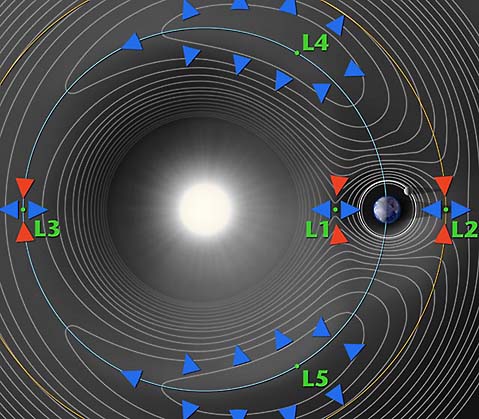
In the above contour plot we see that L4 and L5 correspond to hilltops and L1, L2 and L3 correspond to saddles (i.e. points where the potential is curving up in one direction and down in the other). This suggests that satellites placed at the Lagrange points will have a tendency to wander off (try sitting a marble on top of a watermelon or on top of a real saddle and you get the idea). A detailed analysis (PDF link) confirms our expectations for L1, L2 and L3, but not for L4 and L5. When a satellite parked at L4 or L5 starts to roll off the hill it picks up speed. At this point the Coriolis force comes into play - the same force that causes hurricanes to spin up on the earth - and sends the satellite into a stable orbit around the Lagrange point.
This page was originally written by Neil J. Cornish as part of WMAP's education and outreach program.
A full description is below. main difference is that hi8 is analog format and miniDV is digital. On the other hand, that is the only difference for digital8 and miniDV.
http://en.wikipedia.org/wiki/Hi8
----------------------------------------------------
drill down:
the process of dividing information into a hierarchical scheme, honing in on a small area; thorough investigation and discussion of a narrow topic
(v) In information technology, to move from summary information to detailed data by focusing in on something. To drill down through a series of folders, for example, on a desktop means to go through the hierarchy of folders to find a specific file or to click through drop-down menus in a GUI. To drill down through a database is to access information by starting with a general category and moving through the hierarchy of field to file to record.
(n) Spelled drilldown. The act of focusing in. For example, "He got the information he needed through a drilldown of the database."
there are three functions which can read text data file:
textread
load
dlmread
Below I make a comparison among their reading speed. It turns out that textread is an obvious winner.
--------------------------------
tic
s8=textread('fget1.txt','%f');
toc
tic
s9=load('fget1.txt');
toc
tic
s7=dlmread('fget1.txt');
toc
--------------------------
fget1.txt contains one dimentional array data with 1261050 lines.
Time consumed for each function:
textread: Elapsed time is 5.437752 seconds.
load: Elapsed time is 10.676539 seconds.
dlmread: Elapsed time is 12.076604 seconds.
In the mid-1970s, Cleve Moler and several colleagues developed the FORTRAN subroutine libraries called LINPACK and EISPACK under a grant from the National Science Foundation. LINPACK is a collection of FORTRAN subroutines for solving linear equations, while EISPACK contains subroutines for solving eigenvalue problems. Together, LINPACK and EISPACK represent the state of the art software for matrix computation. In the late 1970s, Cleve, who was then chairman of the computer science department at the University of New Mexico, wanted to be able to teach students in his linear algebra courses using the LINPACK and EISPACK software. However, he didn't want them to have to program in FORTRAN, because this wasn't the purpose of the course. So, as a "hobby" on his own time, he started to write a program that would provide simple interactive access to LINPACK and EISPACK. He named his program MATLAB, for MATrix LABoratory. Over the next several years, when Cleve would visit another university to give a talk, or as a visiting professor, he would end up by leaving a copy of his MATLAB on the university machines. Within a year or two, MATLAB started to catch on by word of mouth within the applied math community as a "cult" phenomena. In early 1983, John Little was exposed to MATLAB because of a visit Cleve made to Stanford University. Little, an engineer, recognized the potential application of MATLAB to engineering applications. So in 1983, Little teamed up with Moler and Steve Bangert to develop a second generation, professional version of MATLAB written in C and integrated with graphics. The MathWorks, Inc. was founded in 1984 to market and continue development of MATLAB.
(http://www.pitchup.com/matlab/faq.aspx)
------------------------
(1)be exposed to...有的时候我们描述一个人,经常会说“他从小就开始接触...”,或是“他从小就接受...熏陶”。Steven今天就给大家介绍一个很好用的短语---be exposed to sthJennifer was exposed to acting at an early age.这是一片介绍《老友记》女主角Jennifer Aniston文章中的一句话。在这里很显然是说:Jennifer早年就开始受到表演艺术的熏陶。
[补充例句]He was exposed to art when he was a little child.他小的时候受到了大量的艺术熏陶。
She was exposed to jazz music when her grandpa was still alive. 在她爷爷在世的时候,她曾广泛接触爵士音乐。
[其他含义]当然,be exposed to sth在不同的情况下面的理解可能也会有所不同。
expose是“使暴露,使曝光”的意思,有的时候是暴露在好的东西里,有的时候是暴露在坏的东西里。所以就有了我们下面的句子:
The children in Iraq are still exposed to violence.
--------------------
(2)
Quick definitions (word of mouth)
noun: gossip spread by spoken communication (Example: "The news of their affair was spread by word of mouth")
reading large files.
http://newsreader.mathworks.com/WebX?50@884.tvTCbnnaAMT.0@.ef3177e
---------------------
http://www.mit.edu/~pwb/cssm/matlab-faq_4.html#loopoverfiles
http://www.pitchup.com/matlab/faq.aspx
memory usage:
http://www.mathworks.com/support/tech-notes/1100/1106.shtml
http://lccb.scripps.edu/tutorials/tutorial_andre_kerstens_033005_2.pdf
http://math.asu.edu/support/cluster/matlabmdce.html
http://www.buy.com/prod/sandisk_2gb_memory_stick_pro_duo/q/loc/101/202220488.html
the gaming version 'clear light blue' one (model #SDMSG-2048-A10) are marketed more as a 'gaming' memory for Sony PSP, also it does not include a memory adaptor like the normal 'solid blue' colored ones (model #SDMSPD-2048-A10). Many believed that the gaming versions are more extreme and to be a better memory than the plain normal solid blue colored ones. This is however a misconception, and is not true. The Gaming versions are actually cheaper to produce and are lower in quality compared to the plain/normal solid blue colored ones. The normal Sandisk memory stick pro duo are made using SLC (single-level cell) memory architecture, while the Sandisk Gaming sticks use the MLC (multi-level cell) memory architecture. SLC is better than MLC in many aspect, such as in performance, efficiency, and longevity. Hence, the normal blue memory stick pro duo (SLC) will have longer life in number of rewrites and faster data transfer, compared to the gaming version ones (MLC). The other difference between the two is, the normal solid blue (SDMSPD) is formatted in FAT16, while the gaming version clear blue one (SDMSG) comes preformatted for PSP. You can however format either memory stick pro duo for use in the PSP and other devices. Ultimately, if you want the better 2GB memory stick pro duo, get the solid blue ones over the gaming version. For those who have the money to spend, do not mind paying more, and simply just want the best of them all in the category, I would recommend the Sandisk 2GB Ultra II memory stick pro duo (model # SDMSPDH-2048-901). Its a waste of money however, if you are using the Sandisk Ultra II on devices that does not have the technology to take advantage of its increase in speed.
More info on MLC and SLC: http://www.memorynet.co.uk/info/faq-single-layer-cell-versus-multi-level-cell.shtml
--------------------------------
In addition, here is a like for what type of pro duo supported by sony camcorder.
http://esupport.sony.com/EN/info/mspro-camcorder.html
------------------------------------
ultra-II pro duo information
http://www.mrgadget.com.au/catalog/memory-stick-ultra-ii-pro-512mb-sandisk-p-388.html
-----------------------------------
http://www.allmemorycards.com/memory-stick-pro-duo.htm
http://www.securityfocus.com/infocus/1806
This is the first in a series of articles on SSH in-depth. We start with looking at standard SSH host keys by examining the verification process to ensure you have not been the victim of an attack. Please note that this article applies to the widely used OpenSSH application that is bundled with most Unix based operating systems, and not the commercial version of SSH.
SSH Host Keys as a protection against Man-In-The-Middle Attacks
SSH is a ubiquitous protocol that offers secure, encrypted connections for a variety of purposes, including logging into remote machines, transferring files, setting up encrypted tunnels, running remote commands without manual authentication, and more. It was created to replace many non-encrypted protocols such as Telnet, FTP, RSH, and the like.
One of the problems with these old protocols, aside from the fact that they send everything (your password included) in the clear, is that they are vulnerable to man-in-the-middle attacks. A cracker with access to the intermediate network could intercept your packets, log them, and then send them to the actual destination. Even worse, she could re-write your packets, perhaps replacing ls -l mydir with rm -r mydir, or send you a trojaned file via your intercepted FTP session rather than the original. Since these protocols have no way to know with certainty whom you were talking to, any number of tricks were possible.
SSH offers a crucial feature -- the ability for you to verify the identity of the host to which you're connecting. If you correctly verify the host, then there's no way an intermediate device could be reading or manipulating your packets. [ref 1] Successful host verification indicates that the connection is encrypted end-to-end -- your SSH client has established a secure connection with the SSH server itself, and no intermediate machines have access to that connection.
Host verification is not unique to SSH. Any decent security-aware protocol has some sort of peer verification. For example, let's take a look at HTTPS, the SSL/TLS encrypted version of HTTP. It also offers host verification in much the same way as SSH. HTTPS host verification looks like the following. I've taken the liberty of mapping SSL-speak into SSH-speak to make it clearer to compare later on. [ref 2]
The client (web browser) connects to the server (HTTPS-aware webserver on port 443.)
The server provides its public key (X509 Certificate).
Some mystical, mathematical number crunching proves that the server has access to the private key associated with the public key.
The browser checks to see that the public key was signed by a trusted Certificate Authority (such as Verisign, Thawte, or others).
The browser checks that The CN (X509 Common Name) value in the server's certificate matches the host name you used. IE if connecting to https://www.example.com, then the certificate needs to have www.example.com as the CN value.
All of these step have their analogue in the world of SSH except for one: there is no Certificate Authority at all. [ref 3] Instead, the 'authority' are your personal and global configuration files, which we'll see later.
SSH Host Keys in Action
Let's see how SSH maps these steps by making an SSH connection to a machine we've never contacted before:
$ ssh ssh-server.example.com
The authenticity of host 'ssh-server.example.com (12.18.429.21)' can't be established.
RSA key fingerprint is 98:2e:d7:e0:de:9f:ac:67:28:c2:42:2d:37:16:58:4d.
Are you sure you want to continue connecting (yes/no)?
Let's say we blindly say "yes" here, and the connection will continue:
$ ssh ssh-server.example.com
Are you sure you want to continue connecting (yes/no)? yes
Warning: Permanently added 'ssh-server.example.com,12.18.429.21' (RSA) to the list of known hosts.
Password: (enter password)
ssh-server.example.com $
The server presented its host key to the client as part of the initial handshake. The mathematical magic to prove it had access to this key is not seen above, indicating there were no errors in that regard.
Since we've never connected to this machine before, and SSH doesn't have the concept of a trusted third party like Certificate Authorities in the world of SSL/TLS, it's up to you to do all the key management yourself. Your client shows you the key fingerprint, an easy-to-read string of numbers that you can use to check the key manually -- we'll see this later. If you say "Yes, the fingerprint is correct", then your SSH client will continue logging in, allow you to type your password, and let you do your work.
When you said 'yes', above, your SSH client saved the server's host key locally in the file $HOME/.ssh/known_hosts. This file is, effectively, your personal Certificate Authority -- it is the list of all SSH server host keys that you have determined are accurate. Let's take a look at the last line of this file, which was just added on your behalf:
$ tail -1 $HOME/.ssh/known_hosts
ssh-server.example.com,12.18.429.21 ssh-rsa AAAAB3NzaC1yc2EAAAABIwAAAIEA0
6jFqviLMMJ/GaJNhGx/P6Z7+4aJIfUqcVjTGQasS1daDYejcfOAWK0juoD+zS3BsGKKYKPA
5Gc5M8v+3NHLbPn1yTpDBgl6UzA0iiMPCbwnOLx61MrBTk+/qJI9kyDaJf4LEY6Chx4IJP0
ZN5NmAlCtXQsca3jwFAF72mqPbF8=
(I've taken the liberty of wrapping and indenting this line for clarity.)
Each entry in known_hosts is one big line with three or more whitespace separated fields as follows:
One or more server names or IP addresses, joined together by commas.
The type of key (described later).
The public key data itself (encoded to stay within the ASCII range).
Any optional comment data (not present in the above output).
The next time you connect to this machine, your SSH client will go through the standard steps of verifying the remote machine and allowing you to log in:
$ ssh ssh-server.example.com
Password: (enter password)
Note that, this time, it did not ask you to verify the key fingerprint at all. That's because the key was in your $HOME/.ssh/known_hosts file. The SSH client actually checks in a few places:
The global known hosts file, typically /etc/ssh/ssh_known_hosts. This can be modified by changing the GlobalKnownHostsFile parameter in the ssh configuration file (typically /etc/ssh/ssh_config).
The user's known hosts file, typically $HOME/.ssh/known_hosts. This can be modified by changing the UserKnownHostsFile parameter in the ssh configuration file.
As you should have noticed, when we connected originally and accepted the key, it stored both the hostname (ssh-server.example.com) and the IP address (12.18.429.21) so we can connect to this machine using either and it will be able to find and authenticate the host key from your known_hosts file.
Verifying the host key
I've shown you how to connect for the first time and accept the host key. But how do you know you've gotten the correct key? If you connected to the server, but an attacker has intercepted and proxied your SSH connection, she could have tricked you into accepting her key, not the actual host key. We've got a classic chicken and egg problem here.
The best way to verify a host key is to do so in some out-of-band method. For example the owner of the system could publish the key fingerprint on an SSL-protected web page. One place I worked actually distributed the host key of our main shell server on our laminated 'Emergency Contacts' phone number card, so you could verify it just by pulling out your wallet, even when sitting down at an Internet cafe.
If you don't have an out-of-band option, then the next best thing is to check the host key once you have logged in. The public host key is usually world readable in the /etc/ssh/ directory, so upon logging in you can check the fingerprint of the key file (using ssh-keygen) against the key you accepted on the wire. (ssh-keygen is also used to create SSH host keys and Identities/PubKeys, which we'll discuss later.)
Going back to that first connection we made, let's see how we match up the fingerprint:
$ ssh ssh-server.example.com
The authenticity of host 'ssh-server.example.com (12.18.429.21)' can't be established.
RSA key fingerprint is 98:2e:d7:e0:de:9f:ac:67:28:c2:42:2d:37:16:58:4d.
Are you sure you want to continue connecting (yes/no)? yes
Warning: Permanently added 'ssh-server.example.com,12.18.429.21' (RSA) to the list of known hosts.
Password: (enter password)
ssh-server.example.com $ cd /etc/ssh
ssh-server.example.com $ ls *.pub
ssh_host_dsa_key.pub ssh_host_rsa_key.pub ssh_host_key.pub
ssh-server.example.com $ ssh-keygen -l -f /etc/ssh/ssh_host_rsa_key.pub
1024 98:2e:d7:e0:de:9f:ac:67:28:c2:42:2d:37:16:58:4d ssh_host_rsa_key.pub
Above we see the user accept the key, log in, and then view the key with ssh-keygen manually. If the fingerprints match, you can be reasonably sure [ref 4] that your connection was made to the actual endpoint, even though you didn't know the host key ahead of time.
Host Key Checking Paranoia
SSH has three ways it can react to an unrecognised or changed SSH host key, based on the value of the StrictHostKeyChecking variable:
StrictHostKeyChecking=no
In this, the most insecure setting, it will blindly connect to the server. It will add the server's key if it's not present locally, and if the key has changed it will warn you and then add the key without asking. [ref 5]
This mode is generally not a good idea.
StrictHostKeyChecking=ask
This is the default setting. If you have no host key for the server, it will show you the fingerprint and ask you to confirm, as seen in the examples above. If you connect and the key does not match, then it will prevent you from logging in, and will tell you where to find the conflicting key inside the known_hosts file:
$ ssh -o stricthostkeychecking=ask ssh-server.example.com
@@@@@@@@@@@@@@@@@@@@@@@@@@@@@@@@@@@@@@@@@@@@@@@@@@@@@@@@@@@
@ WARNING: REMOTE HOST IDENTIFICATION HAS CHANGED! @
@@@@@@@@@@@@@@@@@@@@@@@@@@@@@@@@@@@@@@@@@@@@@@@@@@@@@@@@@@@
IT IS POSSIBLE THAT SOMEONE IS DOING SOMETHING NASTY!
Someone could be eavesdropping on you right now (man-in-the-middle attack)!
It is also possible that the RSA host key has just been changed.
The fingerprint for the RSA key sent by the remote host is
23:00:20:83:de:02:95:f1:e3:34:be:57:3f:cf:2c:e7.
Please contact your system administrator.
Add correct host key in /home/xahria/.ssh/known_hosts to get rid of this message.
Offending key in /home/xahria/.ssh/known_hosts:8
RSA host key for localhost has changed and you have requested strict checking.
Host key verification failed.
StrictHostKeyChecking=yes
This is the most secure, perhaps even unfriendly, setting. If you have no host key for this server, then it will prevent you from logging in at all:
$ ssh -o 'StrictHostKeyChecking=yes' ssh-server.example.com
No RSA host key is known for localhost and you have requested strict checking.
Host key verification failed.
If you do have a host key but it does not match, you will get an error, just as with StrictHostKeyChecking=ask
Why Can A Host Key Change?
There are several reasons a host key can change or appear to be new. In the case of cracker activity, an error seen during the host key verification phase is the only way you'll know before you log in. However there are some other common problems that are not related to malicious activity that cause host key mismatches.
Either the client or server software has changed, and now they are negotiating SSHv2 whereas before they were negotiating SSHv1. [ref 6]
The machine has been re-installed with the same hostname, but the original keys were not restored. Since they've been created anew, they will of course not match your known_hosts file.
The machine to which you wish to connect has been moved to a different DNS name or IP address, or it's been replaced by a new one entirely.
Types of Host Keys
SSH comes with two major protocols, SSHv2 and SSHv1. [ref 7]
The older SSHv1 protocol relied exclusively on RSA for it's asymmetric encryption, whereas the newer SSHv2 protocol supports ether RSA or DSA asymmetric encryption. An SSH server can use any of the three types of host keys: SSHv1 RSA keys, SSHv2 RSA keys, or SSHv2 DSA keys. I will refer to these as rsa1, rsa, and dsa keys respectively, as this is the terminology used by the OpenSSH tools.
SSH Host Keys are created with the ssh-keygen command. [ref 8] Most likely, when SSH was installed on your machine, the installation setup or the server startup script created these for you.
The sshd_config file, usually located in the /etc/ssh directory, lists which host keys it will load upon startup:
# Which protocol(s) should we support?
Protocol 2,1
# HostKey for protocol version 1
HostKey /etc/ssh/ssh_host_key
# HostKeys for protocol version 2
HostKey /etc/ssh/ssh_host_rsa_key
HostKey /etc/ssh/ssh_host_dsa_key
If you were installing from scratch, you'd want to create these three keys using ssh-keygen:
# ssh-keygen -t rsa /etc/ssh/ssh_host_rsa_key
# ssh-keygen -t dsa /etc/ssh/ssh_host_dsa_key
# ssh-keygen -t rsa1 /etc/ssh/ssh_host_key
The ssh-keygen program actually creates two files for each key. The first contains both the private and public key, and the second contains just the public key. So upon running the first ssh-keygen command above, you'd have created both /etc/ssh/ssh_host_rsa_key and /etc/ssh/ssh_host_rsa_key.pub. There's no reason not to allow the public key to be world readable, but the private key must be kept protected, since it has no passphrase associated with it. [ref 9] Luckily ssh-keygen sets paranoid permissions for you.
If you doubt that the first file, the one that doesn't end in .pub, contains the private key as well, or for some reason you lose the public key file, you can always regenerate it with the very same ssh-keygen command:
$ ls -1 /etc/ssh/ssh_host_rsa_key*
/etc/ssh/ssh_host_rsa_key
/etc/ssh/ssh_host_rsa_key.pub
$ cat /etc/ssh/ssh_host_rsa_key.pub
ssh-rsa AAAAB3NzaC1yc2EAAAABIwAAAIEApCyGZbDdzrRdszzQUZI+siu3
/mUI57nmjzKwHS7M27AoMZNJ6yIDTn5J3/MVCDJAeyB53LvIFFD9Kzp6P9
fhNhPm8+b0joJ5Wrn+YfUnt2moI3lkAzQUZI+siu3/mUI57nmjzKwH
$ ssh-keygen -y -f /etc/ssh/ssh_host_rsa_key
ssh-rsa AAAAB3NzaC1yc2EAAAABIwAAAIEApCyGZbDdzrRdszzQUZI+siu3
/mUI57nmjzKwHS7M27AoMZNJ6yIDTn5J3/MVCDJAeyB53LvIFFD9Kzp6P9
fhNhPm8+b0joJ5Wrn+YfUnt2moI3lkAzQUZI+siu3/mUI57nmjzKwH
Is there any reason to use one type of host key versus another? Not really. rsa keys will usually be a bit faster for the host key mathematics, but for greatest client interoperability it's best to include both. There are no patents on either algorithm [ref 10] so that is not a concern. If you need to support SSHv1, then obviously you must have an rsa1 key.
Tips
There are a number of tricks that can make managing host keys easier and more secure for you and/or you users.
Maintain a global known hosts files (/etc/ssh/ssh_known_hosts) that contains all the machines to which your users will connect. If you take the time to verify these keys, then you do not need to rely on the users to do so independently. Make sure you get all three forms of the host key, rsa, dsa, and rsa1. Also, should you ever need to change a host key (say the original machine has been re-installed and you forgot to save the old key) then you have only one place to update it.
Maintain your global known hosts file with as many aliases as you might expect your users to try. For example you should include both mail and mail.my_co.com if that host can be reached by both names.
If you have multiple machines that can be reached with the same name, such as a load balanced pair of webservers, then include both host keys under the shared name. The ssh client will check all matches until it finds one, so you can share a common DNS name without sharing the host key itself.
Here's a very simple shell script that connects to an SSH server and adds all three potential host keys to a file. This may be useful when creating your global ssh_known_hosts file, but note that there's no actual verification here, that's up to you.
#!/bin/sh
#
# add-known-hosts
# Add all possible SSH keys for the specified hosts to the file
# specified. It's your responsibility to be sure that the keys
# found are, in fact, valid.
#
# Copyright 2003, Brian Hatch
# Released under the GPL
KNOWN_HOSTS=./ssh_known_hosts
SSH_ARGS="-o StrictHostKeyChecking=no -o UserKnownHostsFile=$KNOWN_HOSTS"
if [ $# -lt 1 ] ; then
echo "Usage: $0 hostname [hostname ...]" >&2
exit 1;
fi
for host in "$@"
do
ssh $host $SSH_ARGS -1 echo ''
ssh $host $SSH_ARGS -o'HostKeyAlgorithms=ssh-rsa' echo ''
ssh $host $SSH_ARGS -o'HostKeyAlgorithms=ssh-dss' echo ''
done
Configuration Options
There are several configuration options which might be useful, depending on how you are using SSH. These can live in either the global SSH configuration file, typically /etc/ssh/ssh_config, or the user configuration file, typically $HOME/.ssh/config. See the ssh_config manpage for more information.
StrictHostKeyChecking: Determines if you should ignore errors with the server's host key when you connect, die immediately, or ask the user if they should continue.
CheckHostIP: Determines if SSH will check for the server's IP address in the known_hosts file.
NoHostAuthenticationForLocalhost: Turn off host key checking for the local machine only. Useful if you set up SSH Port Forwards to remote machines, ala ssh -p 9999 localhost, but you need to live with the consequences. Better to use HostKeyAliases as appropriate.
HostKeyAlias: This option allows you to specify an 'alias' that will be used, instead of the actual hostname on the command line, when looking for a match in the known_hosts file. Particularly useful for commands that use ProxyCommands to connect, or are based on multiple ports on a machine that forward to different SSH servers behind it, such as a firewall.
HostKeyAlgorithms: The algorithm you prefer, RSA or DSA, for protocol 2 host keys. RSA is the default, and unless you have a preference you may as well stick with it for performance purposes.
http://www.linuxjournal.com/article/1327
A simple command with a lot of uses.
The wc (word count) command is a very simple utility found in all Unix variants. Its purpose is counting the number of lines, words and characters of text files. If multiple files are specified, wc produces a count for each file, plus totals for all files.
When used without options wc prints the number of lines, words and characters, in that order. A word is a sequence of one or more characters delimited by whitespace. If we want fewer than the three counts, we use options to select what is to be printed: -l to print lines, -w to print words and -c to print characters. The GNU version of wc found in Linux systems also supports the long options format: --chars (or --bytes), --words, --lines.
When I applied wc to an earlier version of the LaTeX source file with this text, I received the following information from wc:
wc wc.tex
98 760 4269 wc.tex
This line means that the file had 98 lines, 760 words and 4269 characters (bytes). Actually, I seldom use wc alone. Due to its simplicity wc is mostly useful when used in combination with other Linux commands.
If we use a file system other than Linux (or Unix), namely DOS, there is an ambiguity due to a line break being a combination of a carriage return and a line feed. Should -c count a line break as two characters or only one? The POSIX.2 standard dictates that -c actually counts bytes, not characters, and it provides the -m option to count characters. This option cannot be used together with -c, and for that matter, GNU wc does not support -m. If we desperately need it, we can always subtract the line count from the byte count to obtain the char count of a DOS file. Here are two different ways to achieve this:
wc /dosc/autoexec.bat | awk '{print $3-$1}'
tr -d '\015' < /dosc/autoexec.bat | wc -c
The first solution uses awk to subtract the first field (the line count) from the third field (the byte count). The second solution uses tr to delete the carriage returns (char 15 in octal) from the input before feeding it to wc.
Recently I used a CD-ROM writer that was connected to a machine that was slightly sick. Now and then a block of 32 consecutive bytes got corrupted while copying amongst different hard disk partitions. This caused quite a few CD-ROM backups to be damaged. Sometimes the damage affected a large file, and in this case, it was cheaper to keep the bad file and add a small patch file to the next backup. To decide whether we should make a new full backup of a corrupted file or just make a differential patch, we used the cmp command to detect the differences, followed by wc to count them:.
cmp -l /original/foo /cdrom/foo | wc -l
The -l option to cmp provides a full listing of the differences, one per line, instead of stopping on the first difference. Thus, the above command outputs the number of bytes that are wrong.
If we want to count how many words are in line 70 of file foo.txt then we use:
head -70 foo.txt | tail -1 | wc -w
Here, the command head -70 outputs the first 70 lines of the file, the command tail -1 (i.e., the number 1) outputs the last line of its input, which happens to be line 70 of foo.txt, and wc counts how many words are in that line.
If our boss presses us to include in our monthly project report a count of the number of lines of code produced, then we can do it like this:
wc -l */*.[ch] | tail -1 | awk '{print $1}'
This assumes that all our code is in files with extension .h or .c, and that these files live in subdirectories one level deep from our current directory. If file depth is arbitrary, we use the following:
wc -l `find . -name "*.[ch]" -print` | tail -1 | awk '{print $1}'
Notice the use of back quotes in the find command line, and forward (normal) quotes in the awk command. The command find . -name "*.[ch]" -print outputs the *.c and *.h files located below the current directory, one per line. The back quotes cause that command to be executed, and then replace each newline in the command's output with a blank, and pass that output to the wc command line.
If in good GNU style you mark all current bugs and dirty hacks in your source code with the word FIXME, then you can see how much urgent work is pending by typing:
grep FIXME *.c | wc -l
The grep outputs all lines that have a FIXME, and then we just have to count them.
As you can see there is nothing special about the wc command; however, half of my shell scripts would stop working if that command was not available.
http://idioms.thefreedictionary.com/get+back+into+the+swing+of+things
to become familiar with an activity or situation so that you can start doing it well or enjoying it. I was just getting into the swing of things when they transferred me to another department. I hadn't worked in an office for a few years and it took me a while to get back into the swing of it.
"Work is kind of busy here right now, so I'm trying to get myself back into the swing of it today...."
roller coaster
n.
A steep, sharply curving elevated railway with small open passenger cars that is operated at high speeds as a ride, especially in an amusement park.
An action, event, or experience marked by abrupt, extreme changes in circumstance, quality, or behavior: “the demographic roller coaster caused by the baby boom” (American Demographics).
"went on my almost-first ever roller coaster (the other one I went on was not really so big)."
while I listened to Nature podcast, I came across some new words to me. Here they are.
--------------
sticky situation:
sticky:
adjective: moist as with undried perspiration and with clothing sticking to the body (Example: "Felt sticky and chilly at the same time")
adjective: hot or warm and humid (Example: "Sticky weather")
adjective: hard to deal with; especially causing pain or embarrassment (Example: "A sticky question")
adjective: having the properties of glue
生活中总是有很多让人“左右为难”的事情,比如说今天又有哥们向我来借钱!这个哥们声称他有一笔赚大钱的买卖,但苦于资金有限,所以想先在我这里支点银子,等赚了钱之后,不但立刻归还,还会另有酬劳;说实话,我一点也不看好他的买卖,但是,不借吧,伤了哥们的和气;借吧,又恐这钱是有去无回;我就象Michael 咨询了一下该如何处理。
Michael说这真是一件sticky business,因为在美国大笔借款一般是到银行去贷款,所以他劝我应该直截了当地回绝那个哥们。接着他说自己现在也遇到了a sticky business,他的父母希望他能尽快回国,而他却想留在中国,正在左右为难;我感叹了一句You're in a situation that is difficult to deal with. 他说这就是 sticky business的意思。我想了一下:stick是“粘”的意思,sticky当然也就有“粘性的”的意思,“粘的(sticky)东西粘到了手上可真是不好办”,所以sticky business表示“让人左右为难的事情”也还是可以推理出来的,只是我以前总是用difficult、hard这些词,看来还不如sticky business形容起来更加形象。不过Michael告诉我,sticky business在口语中用的比较多,正式场合或者是书面语中,还是difficult等词出现得频繁
(2) Dexterity:
1 : mental skill or quickness : ADROITNESS
2 : readiness and grace in physical activity; especially : skill and ease in using the hands
The traditional lengthy lunch break long associated with siestas in Spain will end for civil servants under a law that took effect last week. Government ministries will close at 6 p.m., meaning workers must take shorter lunch breaks--but can get home to their families sooner. Stereotypes notwithstanding, Spain's siesta custom is often problematic for workers, who typically toil well into the evening after returning from lunch. Despite their long hours, a new report found, Spanish workers' productivity is low.
Civil servant: noun: a public official who is a member of the civil service
siesta: afternoon rest: an early afternoon rest or nap
[Mid-17th century. Via Spanish < Latin sexta (hora) "sixth (hour of the day), noon"]
toilnoun: noun: productive work (especially physical work done for wages)
verb: work hard
When voters in Bolavia elected Morales to be their next president in mid-December, some saw onetime coca famers rise to the power as a blessing for south American's poorest nation. As a native Amaya indian, Morales gives a high-profile representation to the long suffering indegenous majority. But he also takes after leftiest leader, which may bode ill for US-Bolivian relations.
He proclaimed himself American's nightmare and he also pledged to encourage coca production, which foes say that amount to quitting the drug war.
foes
woes:
1. Deep distress or misery, as from grief; wretchedness. See Synonyms at regret.
2. Misfortune; calamity: economic and political woes.
